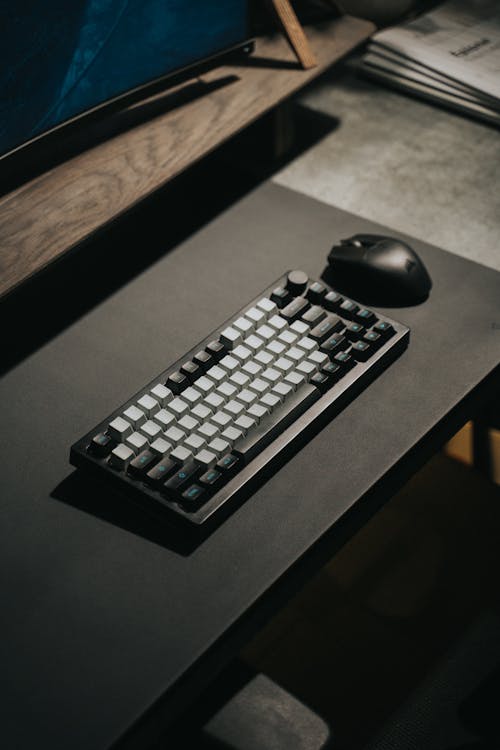
Photo by Minh Phuc on Pexels
Desk Setup Builder may earn a commission from purchases made through links in this article.
A mechanical keyboard uses individual switches under each key instead of the rubber dome membrane that most cheap keyboards use. The difference is immediately obvious: each keypress has a distinct feel and consistent actuation point. You know exactly when a key registers because you can feel it (and sometimes hear it). This makes typing faster, more accurate, and more satisfying over long sessions.
But the mechanical keyboard market has exploded in the last few years, and the sheer number of options can be paralyzing. Switch types, board sizes, hot-swap PCBs, keycap materials, gasket mount vs tray mount, it's a lot. This guide cuts through the jargon and tells you what actually matters for your first (or next) board.
Every mechanical switch falls into one of three categories:
If you're unsure, start with a tactile switch like Cherry MX Brown or Gateron Brown. They are middle-of-the-road in feel and noise, and most people find them comfortable immediately.
A hot-swap PCB lets you pull switches out and push new ones in without soldering. This is the single most important feature for anyone new to mechanical keyboards. Why? Because you won't know what switches you like until you try them. Hot-swap means you can start with Browns, decide you want something smoother, and swap in Linears the same afternoon. No desoldering, no risk of damaging the PCB.
Almost all modern enthusiast boards come with hot-swap sockets. If a board doesn't have them, skip it unless you specifically want to solder.
Wireless keyboards have gotten good enough that latency is no longer a real concern for most people, including gamers. Boards that use 2.4GHz wireless dongles (like the Keychron Q series with a dongle) are functionally indistinguishable from wired in terms of input lag. Bluetooth has slightly more latency and occasional connectivity hiccups, but for typing and general use it's perfectly fine.
That said, wired keyboards never need charging and never have connection issues. If your keyboard sits on your desk and never moves, wired is simpler. If you switch between devices or want a cleaner desk, wireless is worth it.
PBT (polybutylene terephthalate) keycaps are thicker, more textured, and resistant to the shiny wear that develops on cheaper keycaps over time. They produce a deeper, thockier sound. PBT is what most enthusiast boards ship with now.
ABS (acrylonitrile butadiene styrene) keycaps are thinner and smoother. They develop a shiny, greasy look after months of use. However, ABS can be made with sharper legends and more vibrant colors, which is why high-end custom keycap sets (like GMK) use doubleshot ABS.
For most people, PBT is the better default. It feels better, lasts longer, and doesn't develop shine. If you want to get into custom keycap sets later, that's a whole other rabbit hole.
Keychron Q series (~$150-$200). The Keychron Q1 (75%), Q2 (65%), and Q3 (TKL) are the boards we recommend most often. They are hot-swap, gasket-mounted, come with PBT keycaps, and have excellent build quality with an aluminum case. The Q series sounds great out of the box and supports VIA/QMK for full key remapping. Available in wired and wireless versions.
GMMK Pro (~$170). Glorious's 75% board is another strong option in the same category. It has a rotary knob, hot-swap sockets, and a CNC aluminum case. The GMMK Pro ships as a barebones kit (no switches or keycaps), which is actually great if you want to pick your own switches from the start.
Leopold FC660M (~$120). If you want a no-nonsense, high-quality keyboard that just works, the Leopold is hard to beat. It isn't hot-swap and doesn't have RGB, but the stock keycaps are excellent PBT, the Cherry MX switches are perfectly tuned, and the build quality is rock solid. The FC660M is a 65% board that many typists swear by.
Ducky One 3 Matcha (~$109). The Ducky One 3 is a solid all-around board that comes in multiple sizes (full, TKL, 65%, 60%). It's hot-swap with Cherry MX switches, has PBT doubleshot keycaps, and includes Ducky's QUACK Mechanics software for customization. The Matcha colorway is a community favorite with its muted green tones. A great entry point that doesn't feel like a compromise.
YUNZII B75 PRO (~$68). If you want to try a mechanical keyboard without spending over $100, the YUNZII B75 PRO is a surprisingly good value. It's a 75% wireless board with a retro-inspired design, hot-swap sockets, and Bluetooth/2.4GHz/wired connectivity. The gasket-mounted structure gives it a softer, less pingy typing feel than most boards at this price. Available in several colorways.
Most people should get a 75% hot-swap board and figure out switches later. The Ducky One 3 Matcha is a great starting point if you want a complete, ready-to-use board. If you want to spend less, the YUNZII B75 PRO at $68 is the best value entry point. Start there, and explore from there. Check out our keyboard catalog for more options, or browse real desk setups to see what other people are typing on.


